Built For Low-Voltage Contractors

Your Plans.
Every Connection
In View.

Plan device locations, trace cable routes, and prepare coordinated reports for your next installation—all on the floor plans you already have.

$14.99 / Month · One Designer
Renews monthly. Cancel online.
Design on a computer or larger tablet.

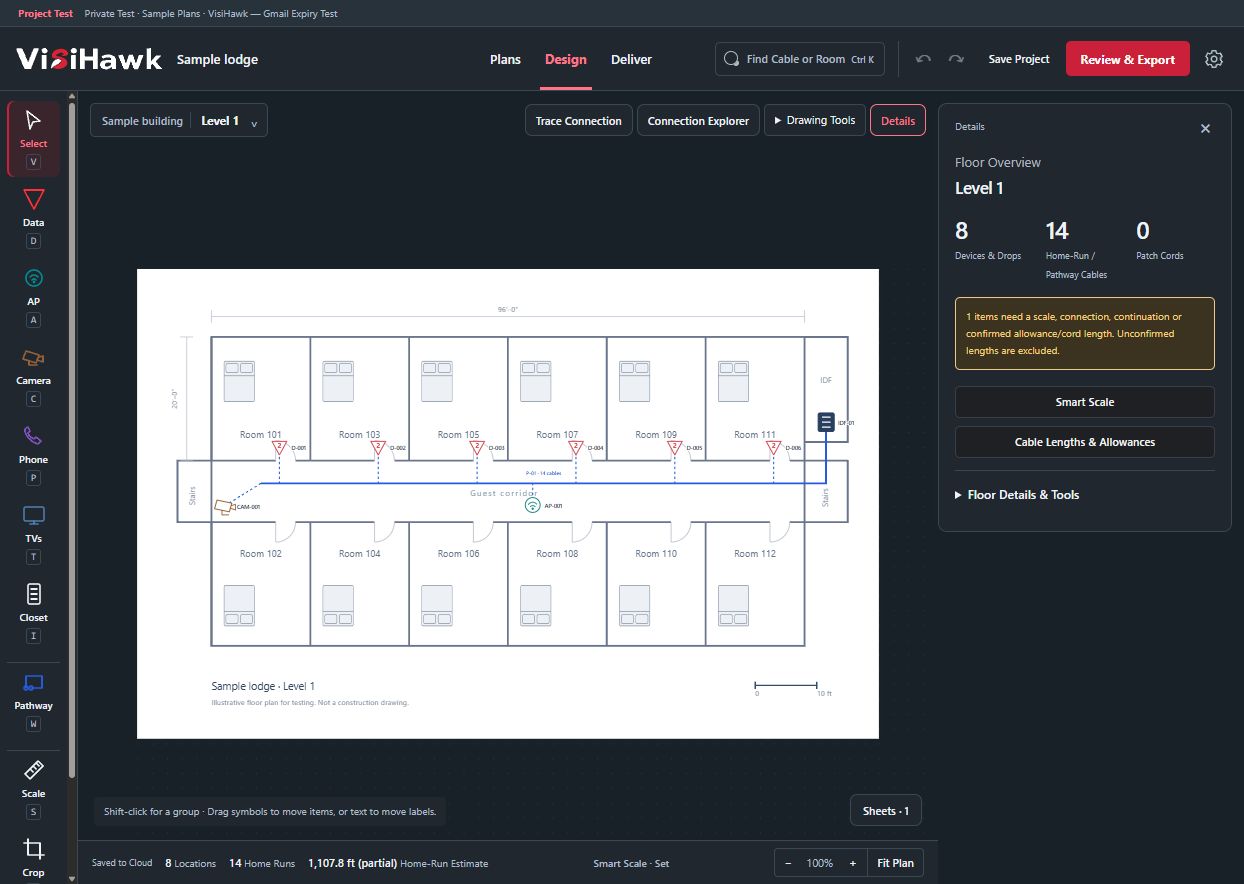
Actual VisiHawk workspace with a sample lodge floor plan, device tools, blue cable pathway and floor details.
The VisiHawk WorkspaceActual app screen · Invented sample project
Import PDF PlansChoose the sheets you need.
Add Plan ImagesUse PNG, JPEG or WebP files.
Create PDF ReportsShare plans and cable schedules.

See What You Can Do
Inside VisiHawk.

From device placement to the cable schedule, keep the details of your low-voltage design connected.

Turn Your Floor Plan
Into A Working Design.

Bring in your PDF or plan image. Establish scale, place your devices, and draw the pathways that connect them.

  • Access points, cameras, data drops and more
  • MDF and IDF closet assignments
  • Route estimates with visible assumptions
Try A Connection
VisiHawk device placement and cable pathway tools on the Sample Lodge floor plan.
Actual app screen · Invented Sample Lodge

Start With Your Plans.

Import a sheet, establish scale, then begin your layout.

Select a step to see the workflow.

Example Lodge · Level 2Workflow Illustration
A Floor Plan Ready To ImportAn invented three-room floor plan. Select a step to reveal its scale reference and example low-voltage connections. Room 201Room 202Room 203Corridor 01020 ft Illustrative Sheet · Not For Installation
Start With The Source SheetSelect the plans you need. Keep the source sheet as the foundation for your design.
PDF & ImagesPDF, PNG, JPEG And WebP
Multi-Floor ProjectsKeep Sheets And Connections Together
From Other Design SoftwareExport Revit And Other BIM Drawings To PDF
Supported Files & Scale Details

The hosted app imports PDFs and images. Native DWG and DXF import is not included. Automatic scale detection requires a supported graphical scale bar with readable PDF text and matching geometry; it does not read scanned lettering. Original PDF sheet details or two-point calibration provide another way to establish scale. Vertical travel, slack and off-sheet routes need their own distances.

Example plan for demonstration only.

The Product, In Your Hands

Follow The Connection.
See The Context.

Watch an access point move and its cable estimate update. Select any AP to take control, or enter Trace Mode to follow its connection.

Interactive Sample · Example Lodge
Example LodgeLevel 2 · Three Guest Rooms
Edit ModeMove an AP, or choose Enter Trace to follow its connection.
Drag an AP in Edit Mode or use the movement controls. On a small screen, swipe the plan sideways to see more.
AP-202 selected. Follow its cable through IDF-01 to MDF-01.Example Plan · Sample Data

See The Finished Report.

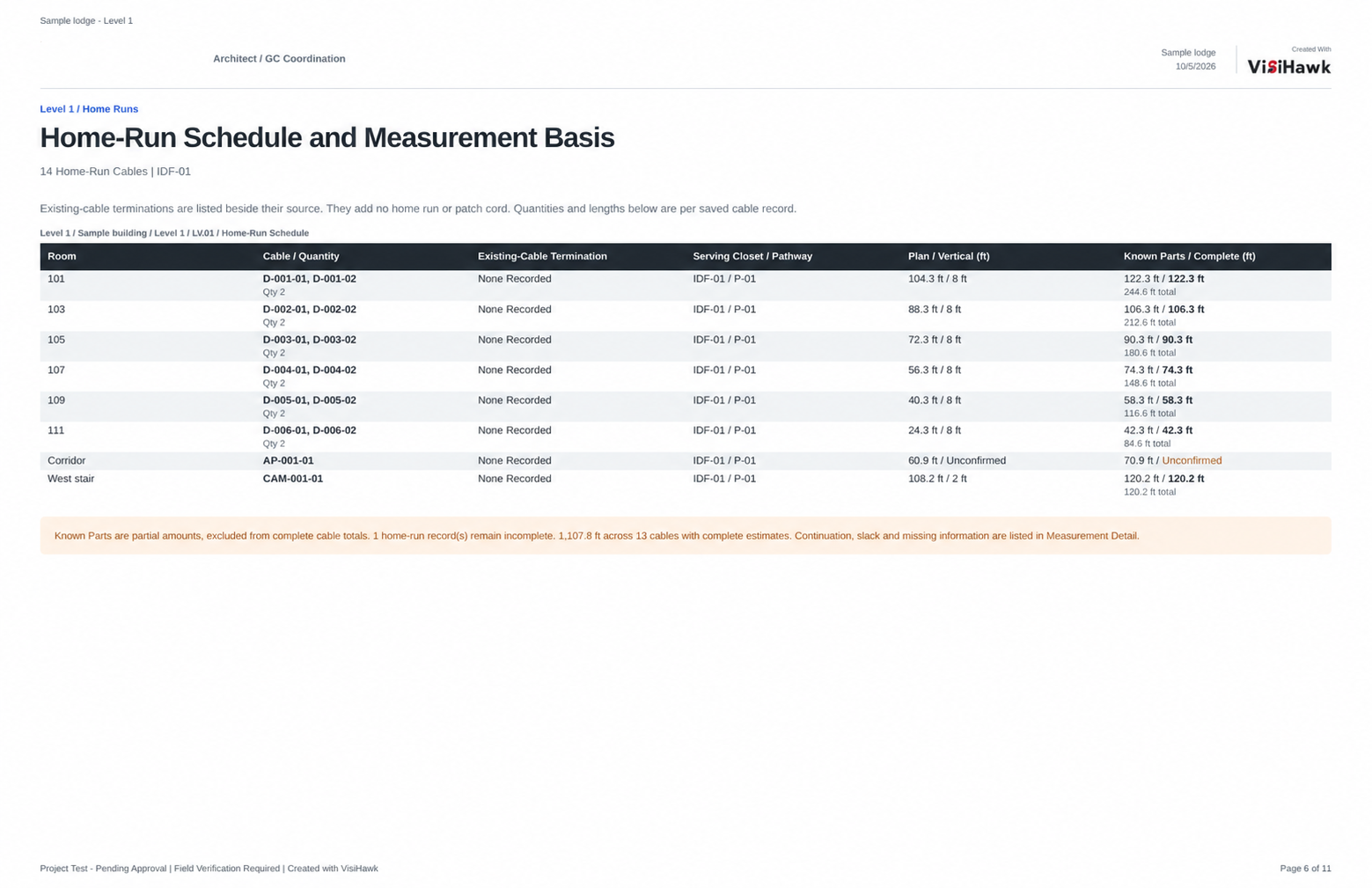
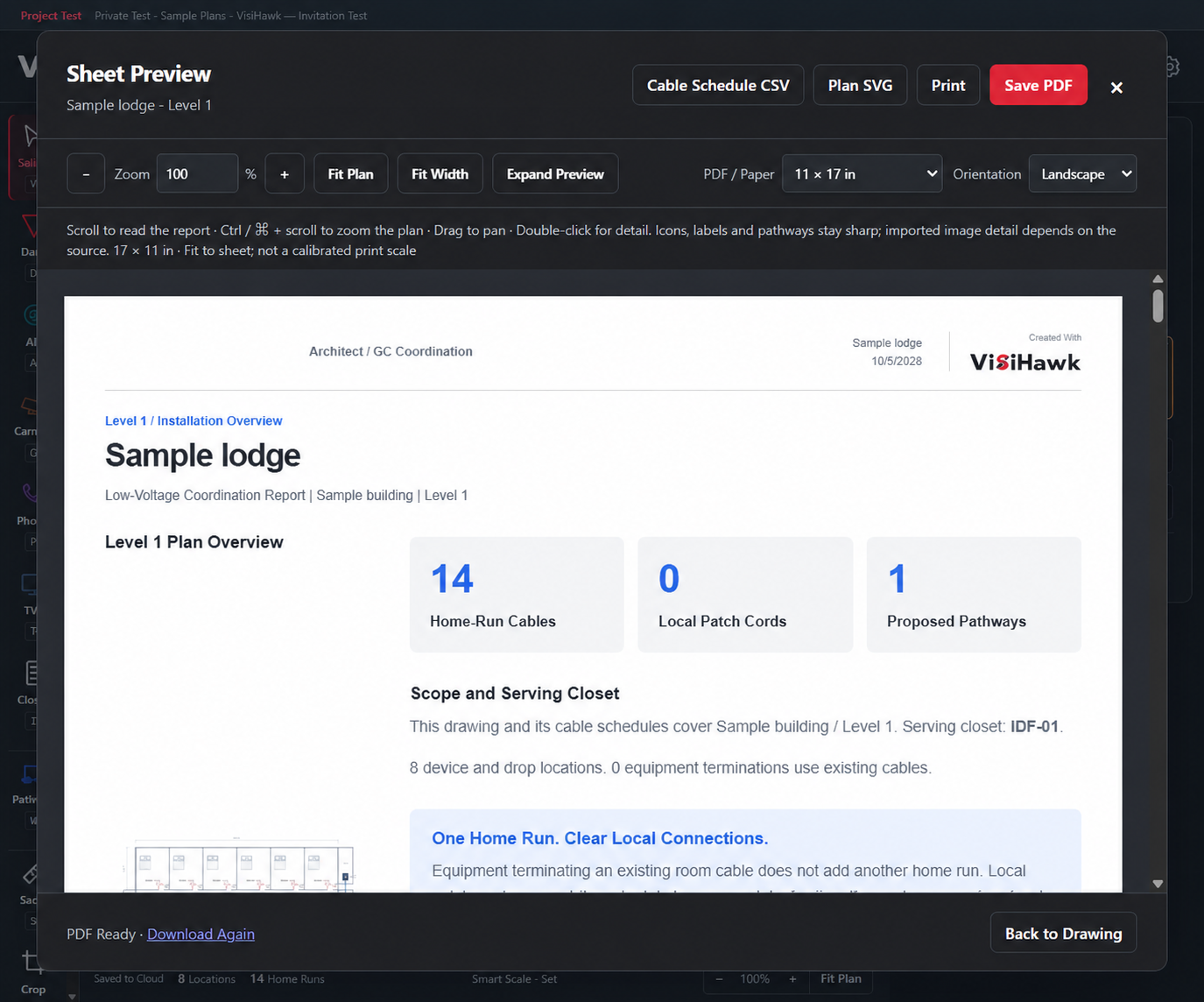
Inspect a sample plan, cable schedule and measurement notes before you subscribe.

One Project. Consistent Details.Preview Of The Downloadable Sample Report

One Plan.
Your Own Workspace.

Start your next low-voltage project with your plans, connections and reports together.

From Purchase To Your First Plan

  1. Purchase Your SubscriptionComplete checkout through Stripe.
  2. Activate Your WorkspaceUse the invitation sent to your purchase email.
  3. Start Your DesignImport your plans, establish scale and place devices.

Questions before you subscribe?
Contact VisiHawk

VisiHawk Web

One Designer Plan

$14.99 USD / month

A private workspace for low-voltage design.

  • 1 DesignerPDF and image plans, device layouts and reports.
  • 20 ProjectsKeep multiple jobs in your workspace.
  • 256 MiB Of Cloud StorageFor project data, plan images and saved work.
  • Cancel OnlineStop the next renewal and keep access through your paid period.

Projects in Trash count toward the project limit. Saved versions, report files and Trash use storage.

Renews automatically each month until canceled. Sign-in instructions are sent after confirmed payment. Subscription Terms & Limits
Coming Soon · 3D Printing

Bring Your Plans
To Life.

From the drawing on your screen to a model you can hold.

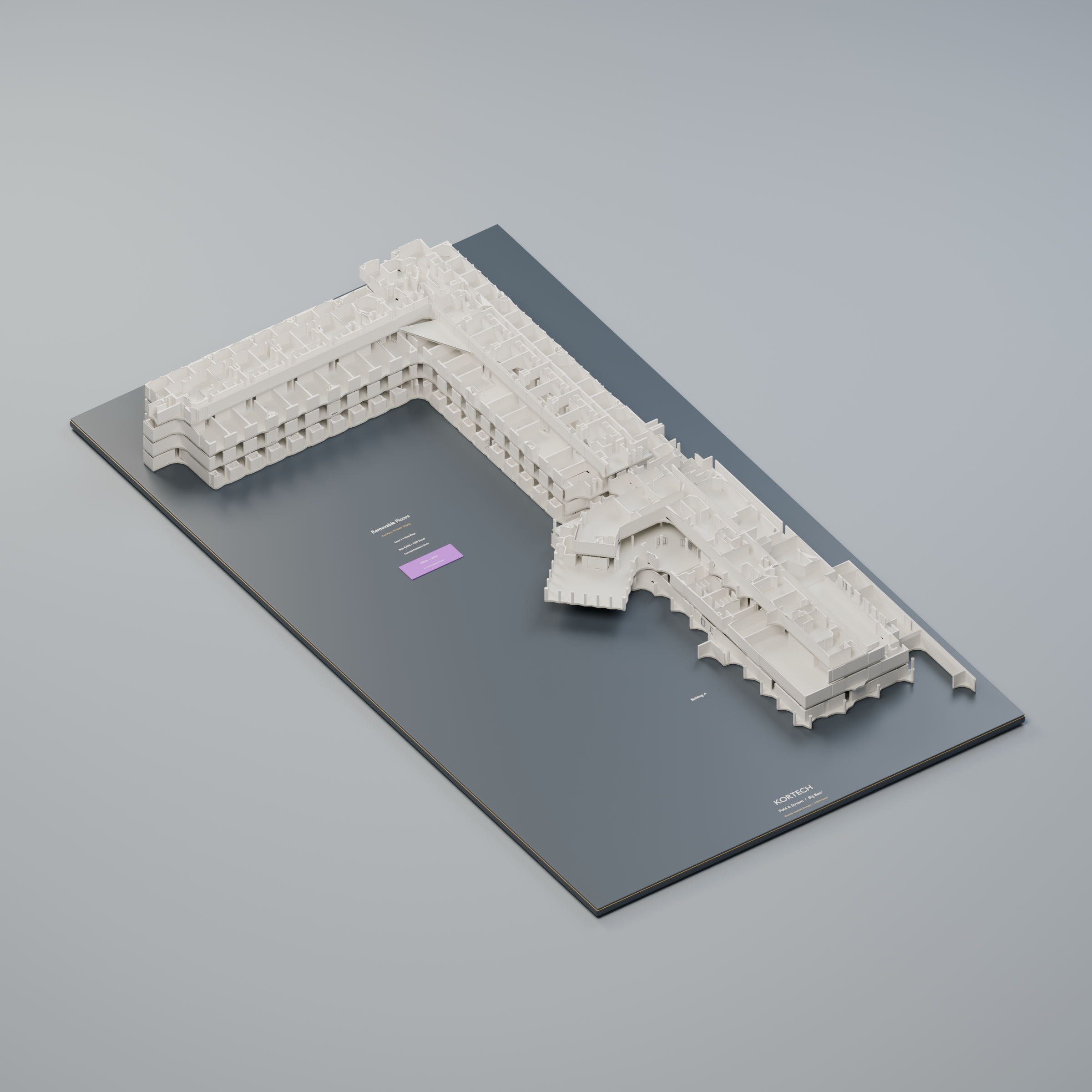
We’re developing an optional 3D printing service to turn your plans into physical architectural models for presentations and project conversations.

A separate paid service. Pricing and availability will be announced here.

Digital render of a multi-level architectural model on a Kortech-branded display base
Architectural Model Concept Digital render · Printing service in development

Before You Begin

A Clear View.
Clear Answers.

The practical details behind the product.

What Can I Design With VisiHawk?

Plan low-voltage devices and cabling on your floor plans. Place access points, cameras, phones, TVs and data drops; connect them through pathways, MDF/IDF closets and fiber; then produce coordinated plans and cable schedules.

Can I Use Drawings From Other Vendors?

Yes, when supplied in a supported format. Import PDF sheets or PNG, JPEG and WebP images. Native DWG and DXF import is not included in the hosted app. Export Revit and other BIM drawings to PDF first. Importing a drawing does not import every feature of the software that created it.

Can It Measure Every Cable Automatically?

It can estimate the drawn route after scale is established. Smart Scale automatically applies supported graphical scale bars with readable PDF text and matching geometry in new PDF imports; printed scales and two-point calibration are other options. Vertical travel, slack, off-sheet continuations and actual installation routes still need review.

Can I Explore VisiHawk Before Buying?

Yes. Explore the interactive sample without signing up. To download the example PDF, request a sample email and verify your address. Marketing emails are optional. The sample uses an invented project and resets when you reload the page. It does not accept your drawings or open saved projects. You do not need to send project files to explore the sample.

What Happens After I Subscribe?

After your payment is confirmed, VisiHawk prepares your private workspace and sends an activation invitation. Verify your purchase email to enter the app. An existing customer can sign in with the same email. No manual approval is needed after confirmed payment. If an email is delayed, keep your purchase confirmation page open and use its recovery controls.

How Does Cancellation Work?

Subscriptions renew monthly until you cancel. You can cancel the next renewal through online billing and keep access until the end of your already-paid billing period. A billing month is not always exactly 30 days. Cancellation stops future renewals; it does not automatically refund unused time. See the subscription terms for refunds and saved-data handling.

Can I Design On A Phone?

The design workspace is intended for computers and larger tablets, where there is room to work accurately on a plan. Phone editing is not supported. You can browse this website and explore the product from your phone.

What Does Cloud Storage Keep?

Cloud saving retains your project, rendered plan images, extracted text and saved versions. It does not archive the original PDF file. Keep your source PDFs and download project backups. The 20-project limit includes Trash; storage includes plan assets, versions and report files. A single saved project or generated report must fit the 32 MiB processing limit.

Will There Be A Desktop Or 3D Edition?

More advanced desktop tools and 3D modeling are part of the future roadmap. They are not included in the current web offering. The architectural images on this page are brand illustrations.

See The Connection.
Build With Confidence.

Get The Sample Report.

See a sample floor plan, cable schedule and measurement notes. Verify your email to download the PDF.

We’ll use your email to deliver the sample. Marketing is optional. Privacy Policy

VisiHawk Web

Your Next Project Starts Here.

One designer at $14.99 USD per month. Renews automatically unless you cancel. Payment is completed securely through Stripe.

Your activation invitation will go to this email after payment. Use the address you want to sign in with.

Your VisiHawk Workspace

Pick Up Where You Left Off.

After your purchase, use the email from your activation invitation to sign in and open your private workspace.

Sign in with the email used for your subscription.

Open VisiHawk
VisiHawk

Contact & Support